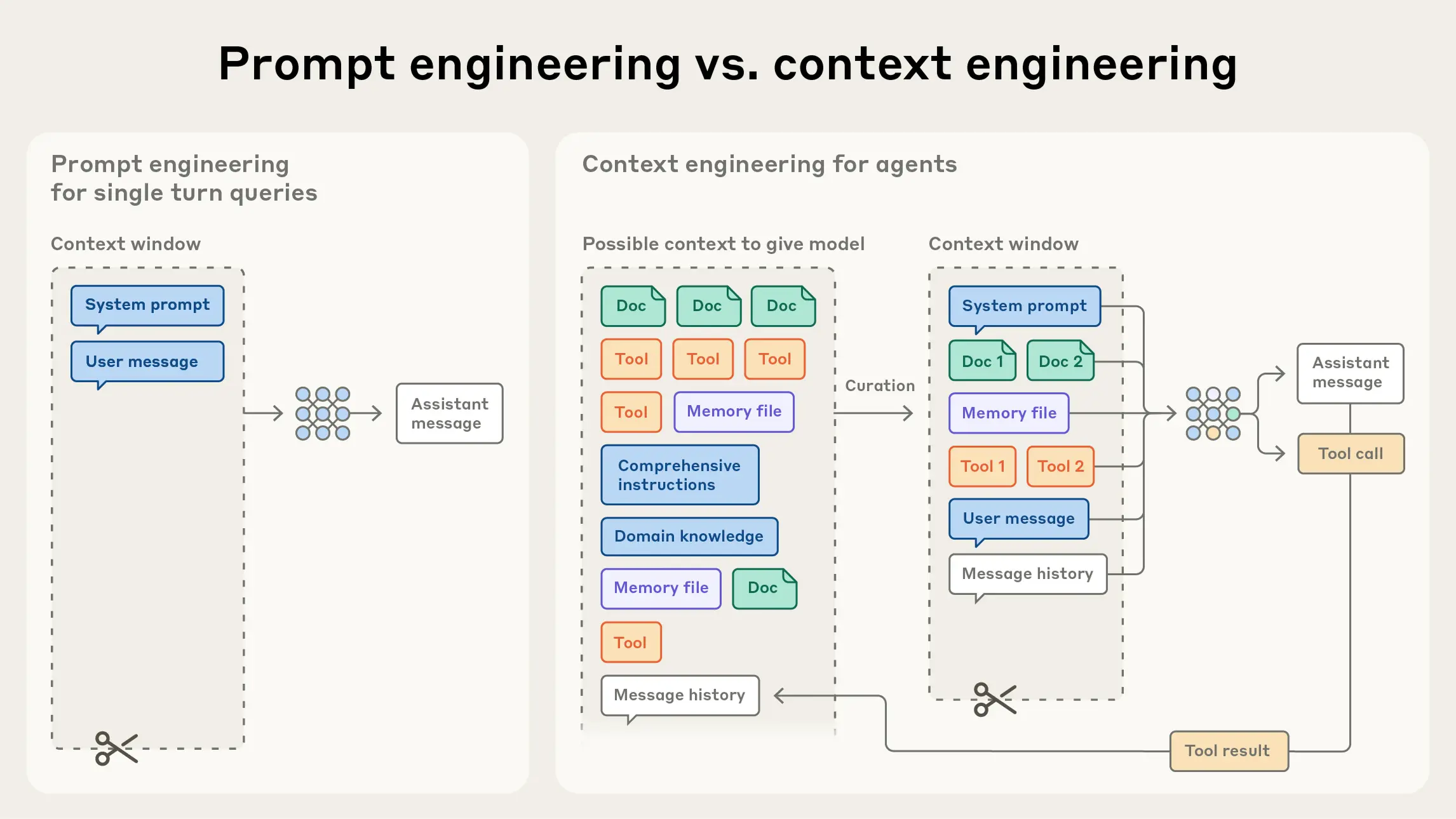
Figure 9.1 Prompt engineering vs Context engineering
Figure 9.1 Prompt engineering vs Context engineering
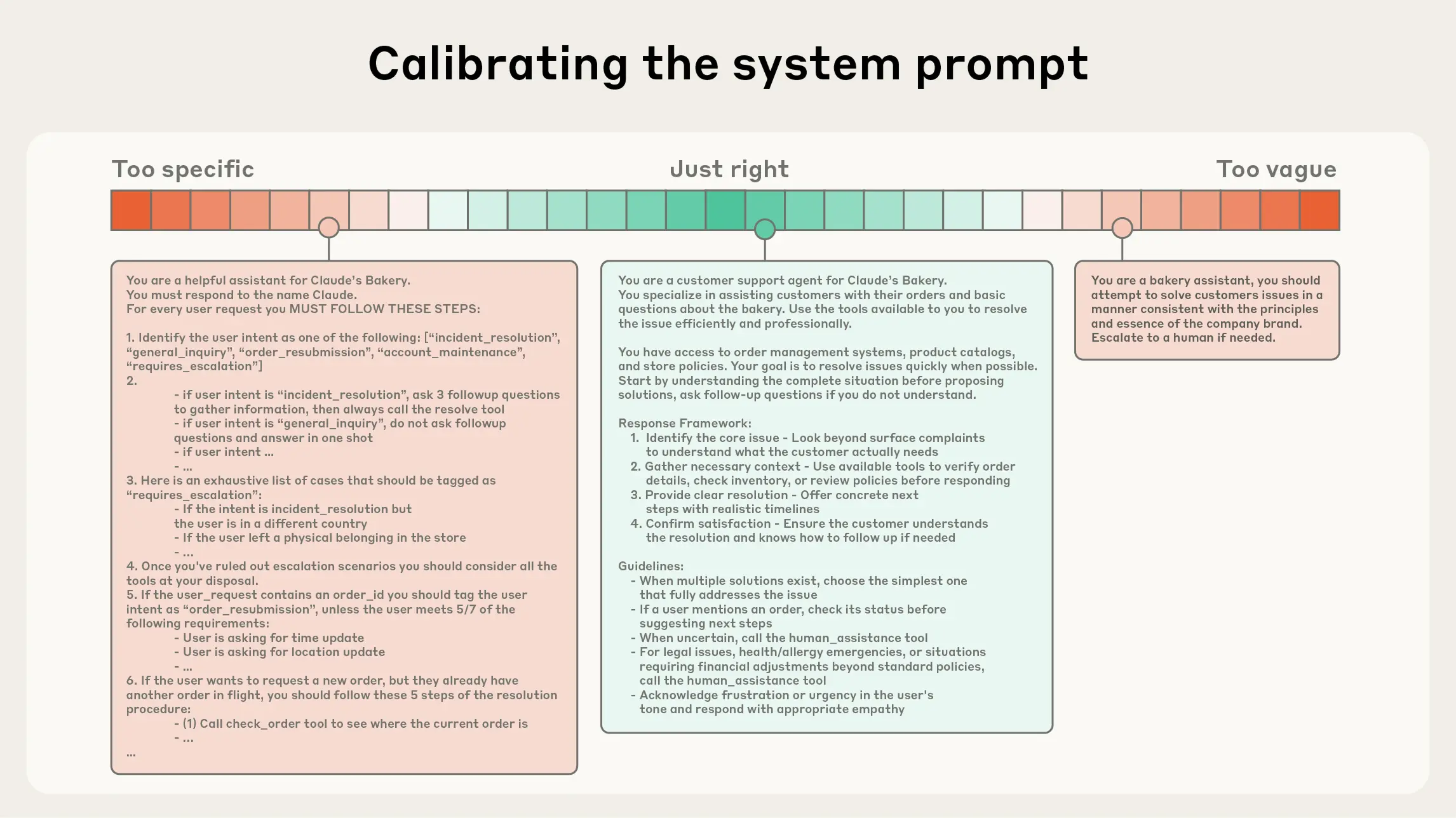
Figure 9.2 Calibrating the system prompt
head/tail—without stuffing entire data blocks into context at once. Its cognitive pattern is closer to humans: we don't memorize all information, but use external indexes like file systems, inboxes, bookmarks to extract on demand.
In addition to storage efficiency, **metadata of references** itself can help refine behavior: directory hierarchy, naming conventions, timestamps, etc., all implicitly convey "purpose and timeliness". For example, tests/test_utils.py and src/core/test_utils.py have different semantic implications.
Allowing agents to autonomously navigate and retrieve also enables **progressive disclosure**: each interaction step generates new context, which in turn guides the next decision—file size hints at complexity, naming hints at purpose, timestamps hint at relevance. Agents can build understanding layer by layer, keeping only the "currently necessary subset" in working memory, and using "note-taking" for supplementary persistence, thereby maintaining focus rather than being "dragged down by comprehensiveness".
The trade-off is: runtime exploration is often slower than pre-computed retrieval, and requires "opinionated" engineering design to ensure the model has the right tools and heuristics. Without guidance, agents may misuse tools, chase dead ends, or miss key information, causing context waste.
In many scenarios, a **hybrid strategy** is more effective: preload a small amount of "high-value" context to ensure speed, then allow agents to continue autonomous exploration on demand. The choice of boundaries depends on task dynamics and timeliness requirements. In engineering, you can preload files like "project convention descriptions (such as README/guides)", while providing primitives like glob, grep, allowing agents to retrieve specific files just-in-time, thereby bypassing the sunk costs of outdated indexes and complex syntax trees.
### 9.2.3 Context Engineering for Long-Horizon Tasks
Long-horizon tasks require agents to maintain coherence, context consistency, and goal orientation in action sequences that exceed the context window. For example, large codebase migrations, systematic research spanning hours. Expecting to infinitely increase the context window cannot cure the problems of "context pollution" and relevance degradation, so engineering methods directly facing these constraints are needed: **Compaction**, **Structured note-taking**, and **Sub-agent architectures**.
- **Compaction**
- Definition: When a conversation approaches the context limit, perform high-fidelity summarization and restart a new context window with the summary to maintain long-range coherence.
- Practice: Have the model compress and retain architectural decisions, unresolved defects, implementation details, discarding repetitive tool outputs and noise; the new window carries the compressed summary + a few recent highly relevant artifacts (such as "recently accessed files").
- Tuning suggestions: First optimize **recall** (ensure no key information is missed), then optimize **precision** (remove redundant content); a safe "light-touch" compression is to clean up "tool calls and results in deep history".
- **Structured note-taking**
- Definition: Also called "agent memory". Agents write key information to **persistent storage outside the context** at fixed frequencies, pulling it back on demand in subsequent stages.
- Value: Maintain persistent state and dependencies with extremely low context overhead. For example, maintaining TODO lists, project NOTES.md, indexes of key conclusions/dependencies/blockers, maintaining progress and consistency across dozens of tool calls and multiple context resets.
- Note: Equally effective in non-coding scenarios (such as long-term strategic tasks, goal management and statistical counting in games/simulations). Combined with MemoryTool from Chapter 8, file-based/vector-based external memory can be easily implemented and retrieved at runtime.
- **Sub-agent architectures**
- Idea: The main agent is responsible for high-level planning and synthesis, while multiple specialized sub-agents each dig deep, call tools, and explore in "clean context windows", finally only returning **condensed summaries** (typically 1,000–2,000 tokens).
- Benefits: Achieve separation of concerns. Complex search contexts remain internal to sub-agents, while the main agent focuses on integration and reasoning; suitable for complex research/analysis tasks requiring parallel exploration.
- Experience: Public multi-agent research systems show that this pattern has significant advantages over single-agent baselines in complex research tasks.
Method trade-offs can follow these rules of thumb:
- **Compaction**: Suitable for tasks requiring long conversation continuity, emphasizing context "relay".
- **Structured note-taking**: Suitable for iterative development and research with milestones/phased results.
- **Sub-agent architectures**: Suitable for complex research and analysis that can benefit from parallel exploration.
Even as model capabilities continue to improve, "maintaining coherence and focus in long interactions" remains a core challenge in building robust agents. Careful and systematic context engineering will maintain its key value in the long term.
## 9.3 Practice in Hello-Agents: ContextBuilder
This section will detail the context engineering practice in the HelloAgents framework. We will gradually demonstrate how to build a production-grade context management system from design motivation, core data structures, implementation details to complete cases. The design philosophy of ContextBuilder is "simple and efficient", removing unnecessary complexity, uniformly selecting based on "relevance + recency" scores, conforming to the engineering orientation of Agent modularity and maintainability.
### 9.3.1 Design Motivation and Goals
Before building ContextBuilder, we first need to clarify its design goals and core value. An excellent context management system should solve the following key problems:
1. **Unified Entry**: Abstract "Gather-Select-Structure-Compress" as a reusable pipeline, reducing repetitive template code in Agent implementations. This unified interface design allows developers to avoid repeatedly writing context management logic in each Agent.
2. **Stable Form**: Output a context template with a fixed skeleton, facilitating debugging, A/B testing, and evaluation. We adopted a sectioned template structure:
- `[Role & Policies]`: Clarify the Agent's role positioning and behavioral guidelines
- `[Task]`: The specific task currently to be completed
- `[State]`: The Agent's current state and context information
- `[Evidence]`: Evidence information retrieved from external knowledge bases
- `[Context]`: Historical dialogue and related memories
- `[Output]`: Expected output format and requirements
3. **Budget Guardian**: Retain high-value information as much as possible within the token budget, providing fallback compression strategies for over-limit contexts. This ensures that even in scenarios with huge amounts of information, the system can run stably.
4. **Minimum Rules**: Do not introduce classification dimensions such as source/priority to avoid complexity growth. Practice shows that a simple scoring mechanism based on relevance and recency is effective enough in most scenarios.
### 9.3.2 Core Data Structures
The implementation of ContextBuilder relies on two core data structures that define the system's configuration and information units.
(1) ContextPacket: Candidate Information Package
```python
from dataclasses import dataclass
from typing import Optional, Dict, Any
from datetime import datetime
@dataclass
class ContextPacket:
"""Candidate information package
Attributes:
content: Information content
timestamp: Timestamp
token_count: Token count
relevance_score: Relevance score (0.0-1.0)
metadata: Optional metadata
"""
content: str
timestamp: datetime
token_count: int
relevance_score: float = 0.5
metadata: Optional[Dict[str, Any]] = None
def __post_init__(self):
"""Post-initialization processing"""
if self.metadata is None:
self.metadata = {}
# Ensure relevance score is within valid range
self.relevance_score = max(0.0, min(1.0, self.relevance_score))
```
`ContextPacket` is the basic unit of information in the system. Each candidate information is encapsulated as a ContextPacket, containing core attributes such as content, timestamp, token count, and relevance score. This unified data structure simplifies subsequent selection and sorting logic.
(2) ContextConfig: Configuration Management
```python
@dataclass
class ContextConfig:
"""Context building configuration
Attributes:
max_tokens: Maximum token count
reserve_ratio: Ratio reserved for system instructions (0.0-1.0)
min_relevance: Minimum relevance threshold
enable_compression: Whether to enable compression
recency_weight: Recency weight (0.0-1.0)
relevance_weight: Relevance weight (0.0-1.0)
"""
max_tokens: int = 3000
reserve_ratio: float = 0.2
min_relevance: float = 0.1
enable_compression: bool = True
recency_weight: float = 0.3
relevance_weight: float = 0.7
def __post_init__(self):
"""Validate configuration parameters"""
assert 0.0 <= self.reserve_ratio <= 1.0, "reserve_ratio must be in [0, 1] range"
assert 0.0 <= self.min_relevance <= 1.0, "min_relevance must be in [0, 1] range"
assert abs(self.recency_weight + self.relevance_weight - 1.0) < 1e-6, \
"recency_weight + relevance_weight must equal 1.0"
```
`ContextConfig` encapsulates all configurable parameters, making system behavior flexibly adjustable. Particularly noteworthy is the `reserve_ratio` parameter, which ensures that key information such as system instructions always has sufficient space and will not be squeezed out by other information.
### 9.3.3 GSSC Pipeline Detailed Explanation
The core of ContextBuilder is the GSSC (Gather-Select-Structure-Compress) pipeline, which decomposes the context building process into four clear stages. Let's dive into the implementation details of each stage.
(1) Gather: Multi-source Information Collection
The first stage is to collect candidate information from multiple sources. The key to this stage is fault tolerance and flexibility.
```python
def _gather(
self,
user_query: str,
conversation_history: Optional[List[Message]] = None,
system_instructions: Optional[str] = None,
custom_packets: Optional[List[ContextPacket]] = None
) -> List[ContextPacket]:
"""Collect all candidate information
Args:
user_query: User query
conversation_history: Conversation history
system_instructions: System instructions
custom_packets: Custom information packages
Returns:
List[ContextPacket]: Candidate information list
"""
packets = []
# 1. Add system instructions (highest priority, not scored)
if system_instructions:
packets.append(ContextPacket(
content=system_instructions,
timestamp=datetime.now(),
token_count=self._count_tokens(system_instructions),
relevance_score=1.0, # System instructions always retained
metadata={"type": "system_instruction", "priority": "high"}
))
# 2. Retrieve relevant memories from memory system
if self.memory_tool:
try:
memory_results = self.memory_tool.execute(
"search",
query=user_query,
limit=10,
min_importance=0.3
)
# Parse memory results and convert to ContextPacket
memory_packets = self._parse_memory_results(memory_results, user_query)
packets.extend(memory_packets)
except Exception as e:
print(f"[WARNING] Memory retrieval failed: {e}")
# 3. Retrieve relevant knowledge from RAG system
if self.rag_tool:
try:
rag_results = self.rag_tool.execute(
"search",
query=user_query,
limit=5,
min_score=0.3
)
# Parse RAG results and convert to ContextPacket
rag_packets = self._parse_rag_results(rag_results, user_query)
packets.extend(rag_packets)
except Exception as e:
print(f"[WARNING] RAG retrieval failed: {e}")
# 4. Add conversation history (only keep recent N entries)
if conversation_history:
recent_history = conversation_history[-5:] # Default keep recent 5 entries
for msg in recent_history:
packets.append(ContextPacket(
content=f"{msg.role}: {msg.content}",
timestamp=msg.timestamp if hasattr(msg, 'timestamp') else datetime.now(),
token_count=self._count_tokens(msg.content),
relevance_score=0.6, # Base relevance of historical messages
metadata={"type": "conversation_history", "role": msg.role}
))
# 5. Add custom information packages
if custom_packets:
packets.extend(custom_packets)
print(f"[ContextBuilder] Collected {len(packets)} candidate information packages")
return packets
```
This implementation demonstrates several important design considerations:
- **Fault Tolerance Mechanism**: Each external data source call is wrapped in try-except, ensuring that failure of a single source does not affect the overall process
- **Priority Handling**: System instructions are marked as high priority, ensuring they are always retained
- **History Limitation**: Conversation history only keeps the most recent entries, avoiding the context window being occupied by historical information
(2) Select: Intelligent Information Selection
The second stage is to score and select candidate information based on relevance and recency. This is the core of the entire pipeline and directly determines the quality of the final context.
```python
def _select(
self,
packets: List[ContextPacket],
user_query: str,
available_tokens: int
) -> List[ContextPacket]:
"""Select the most relevant information packages
Args:
packets: Candidate information package list
user_query: User query (for calculating relevance)
available_tokens: Available token count
Returns:
List[ContextPacket]: Selected information package list
"""
# 1. Separate system instructions and other information
system_packets = [p for p in packets if p.metadata.get("type") == "system_instruction"]
other_packets = [p for p in packets if p.metadata.get("type") != "system_instruction"]
# 2. Calculate tokens occupied by system instructions
system_tokens = sum(p.token_count for p in system_packets)
remaining_tokens = available_tokens - system_tokens
if remaining_tokens <= 0:
print("[WARNING] System instructions have occupied all token budget")
return system_packets
# 3. Calculate comprehensive scores for other information
scored_packets = []
for packet in other_packets:
# Calculate relevance score (if not yet calculated)
if packet.relevance_score == 0.5: # Default value, needs recalculation
relevance = self._calculate_relevance(packet.content, user_query)
packet.relevance_score = relevance
# Calculate recency score
recency = self._calculate_recency(packet.timestamp)
# Combined score = relevance weight × relevance + recency weight × recency
combined_score = (
self.config.relevance_weight * packet.relevance_score +
self.config.recency_weight * recency
)
# Filter information below minimum relevance threshold
if packet.relevance_score >= self.config.min_relevance:
scored_packets.append((combined_score, packet))
# 4. Sort by score in descending order
scored_packets.sort(key=lambda x: x[0], reverse=True)
# 5. Greedy selection: fill from high to low score until token limit is reached
selected = system_packets.copy()
current_tokens = system_tokens
for score, packet in scored_packets:
if current_tokens + packet.token_count <= available_tokens:
selected.append(packet)
current_tokens += packet.token_count
else:
# Token budget is full, stop selection
break
print(f"[ContextBuilder] Selected {len(selected)} information packages, total {current_tokens} tokens")
return selected
def _calculate_relevance(self, content: str, query: str) -> float:
"""Calculate relevance between content and query
Uses simple keyword overlap algorithm. In production, can be replaced with vector similarity calculation.
Args:
content: Content text
query: Query text
Returns:
float: Relevance score (0.0-1.0)
"""
# Tokenization (simple implementation, can use more complex tokenizers)
content_words = set(content.lower().split())
query_words = set(query.lower().split())
if not query_words:
return 0.0
# Jaccard similarity
intersection = content_words & query_words
union = content_words | query_words
return len(intersection) / len(union) if union else 0.0
def _calculate_recency(self, timestamp: datetime) -> float:
"""Calculate temporal recency score
Uses exponential decay model, maintains high score within 24 hours, then gradually decays.
Args:
timestamp: Information timestamp
Returns:
float: Recency score (0.0-1.0)
"""
import math
age_hours = (datetime.now() - timestamp).total_seconds() / 3600
# Exponential decay: maintain high score within 24 hours, then gradually decay
decay_factor = 0.1 # Decay coefficient
recency_score = math.exp(-decay_factor * age_hours / 24)
return max(0.1, min(1.0, recency_score)) # Limit to [0.1, 1.0] range
```
The core algorithm of the selection stage embodies several important engineering considerations:
- **Scoring Mechanism**: Uses weighted combination of relevance and recency, with configurable weights
- **Greedy Algorithm**: Fills from high to low score, ensuring selection of the most valuable information within limited budget
- **Filtering Mechanism**: Filters low-quality information through the `min_relevance` parameter
(3) Structure: Structured Output
The third stage is to organize selected information into a structured context template.
```python
def _structure(self, selected_packets: List[ContextPacket], user_query: str) -> str:
"""Organize selected information packages into structured context template
Args:
selected_packets: Selected information package list
user_query: User query
Returns:
str: Structured context string
"""
# Group by type
system_instructions = []
evidence = []
context = []
for packet in selected_packets:
packet_type = packet.metadata.get("type", "general")
if packet_type == "system_instruction":
system_instructions.append(packet.content)
elif packet_type in ["rag_result", "knowledge"]:
evidence.append(packet.content)
else:
context.append(packet.content)
# Build structured template
sections = []
# [Role & Policies]
if system_instructions:
sections.append("[Role & Policies]\n" + "\n".join(system_instructions))
# [Task]
sections.append(f"[Task]\n{user_query}")
# [Evidence]
if evidence:
sections.append("[Evidence]\n" + "\n---\n".join(evidence))
# [Context]
if context:
sections.append("[Context]\n" + "\n".join(context))
# [Output]
sections.append("[Output]\nPlease provide accurate, evidence-based answers based on the above information.")
return "\n\n".join(sections)
```
The structuring stage organizes scattered information packages into clear sections. This design has several advantages:
- **Readability**: Clear sections make it easier for both humans and models to understand the context structure
- **Debuggability**: Problem localization is easier, can quickly identify which area has problematic information
- **Extensibility**: Adding new information sources only requires creating new sections
(4) Compress: Fallback Compression
The fourth stage is to compress over-limit contexts.
```python
def _compress(self, context: str, max_tokens: int) -> str:
"""Compress over-limit context
Args:
context: Original context
max_tokens: Maximum token limit
Returns:
str: Compressed context
"""
current_tokens = self._count_tokens(context)
if current_tokens <= max_tokens:
return context # No compression needed
print(f"[ContextBuilder] Context over limit ({current_tokens} > {max_tokens}), executing compression")
# Section compression: maintain structural integrity
sections = context.split("\n\n")
compressed_sections = []
current_total = 0
for section in sections:
section_tokens = self._count_tokens(section)
if current_total + section_tokens <= max_tokens:
# Fully retain
compressed_sections.append(section)
current_total += section_tokens
else:
# Partially retain
remaining_tokens = max_tokens - current_total
if remaining_tokens > 50: # Retain at least 50 tokens
# Simple truncation (can use LLM summarization in production)
truncated = self._truncate_text(section, remaining_tokens)
compressed_sections.append(truncated + "\n[... Content compressed ...]")
break
compressed_context = "\n\n".join(compressed_sections)
final_tokens = self._count_tokens(compressed_context)
print(f"[ContextBuilder] Compression complete: {current_tokens} -> {final_tokens} tokens")
return compressed_context
def _truncate_text(self, text: str, max_tokens: int) -> str:
"""Truncate text to specified token count
Args:
text: Original text
max_tokens: Maximum token count
Returns:
str: Truncated text
"""
# Simple implementation: estimate by character ratio
# Should use precise tokenizer in production
char_per_token = len(text) / self._count_tokens(text) if self._count_tokens(text) > 0 else 4
max_chars = int(max_tokens * char_per_token)
return text[:max_chars]
def _count_tokens(self, text: str) -> int:
"""Estimate token count of text
Args:
text: Text content
Returns:
int: Token count
"""
# Simple estimation: Chinese 1 char ≈ 1 token, English 1 word ≈ 1.3 tokens
# Should use actual tokenizer in production
chinese_chars = sum(1 for ch in text if '\u4e00' <= ch <= '\u9fff')
english_words = len([w for w in text.split() if w])
return int(chinese_chars + english_words * 1.3)
```
The design of the compression stage embodies the principle of "maintaining structural integrity". Even when the token budget is tight, it tries to retain key information from each section.
### 9.3.4 Complete Usage Example
Now let's demonstrate how to use ContextBuilder in actual projects through a complete example.
(1) Basic Usage
```python
from hello_agents.context import ContextBuilder, ContextConfig
from hello_agents.tools import MemoryTool, RAGTool
from hello_agents.core.message import Message
from datetime import datetime
# 1. Initialize tools
memory_tool = MemoryTool(user_id="user123")
rag_tool = RAGTool(knowledge_base_path="./knowledge_base")
# 2. Create ContextBuilder
config = ContextConfig(
max_tokens=3000,
reserve_ratio=0.2,
min_relevance=0.2,
enable_compression=True
)
builder = ContextBuilder(
memory_tool=memory_tool,
rag_tool=rag_tool,
config=config
)
# 3. Prepare conversation history
conversation_history = [
Message(content="I'm developing a data analysis tool", role="user", timestamp=datetime.now()),
Message(content="Great! Data analysis tools usually need to handle large amounts of data. What tech stack do you plan to use?", role="assistant", timestamp=datetime.now()),
Message(content="I plan to use Python and Pandas, and have completed the CSV reading module", role="user", timestamp=datetime.now()),
Message(content="Good choice! Pandas is very powerful for data processing. Next you may need to consider data cleaning and transformation.", role="assistant", timestamp=datetime.now()),
]
# 4. Add some memories
memory_tool.execute(
"add",
content="User is developing a data analysis tool using Python and Pandas",
memory_type="semantic",
importance=0.8
)
memory_tool.execute(
"add",
content="Completed development of CSV reading module",
memory_type="episodic",
importance=0.7
)
# 5. Build context
context = builder.build(
user_query="How to optimize Pandas memory usage?",
conversation_history=conversation_history,
system_instructions="You are a senior Python data engineering consultant. Your answers need to: 1) Provide specific actionable advice 2) Explain technical principles 3) Provide code examples"
)
print("=" * 80)
print("Built context:")
print("=" * 80)
print(context)
print("=" * 80)
```
(2) Running Effect Demonstration
After running the above code, you will see the following structured context output:
```
================================================================================
Built context:
================================================================================
[Role & Policies]
You are a senior Python data engineering consultant. Your answers need to: 1) Provide specific actionable advice 2) Explain technical principles 3) Provide code examples
[Task]
How to optimize Pandas memory usage?
[Evidence]
Core strategies for Pandas memory optimization include:
1. Use appropriate data types (such as category instead of object)
2. Read large files in chunks
3. Use chunksize parameter
---
Data type optimization can significantly reduce memory usage. For example, downgrading int64 to int32 can save 50% memory.
[Context]
user: I'm developing a data analysis tool
assistant: Great! Data analysis tools usually need to handle large amounts of data. What tech stack do you plan to use?
user: I plan to use Python and Pandas, and have completed the CSV reading module
assistant: Good choice! Pandas is very powerful for data processing. Next you may need to consider data cleaning and transformation.
Memory: User is developing a data analysis tool using Python and Pandas
Memory: Completed development of CSV reading module
[Output]
Please provide accurate, evidence-based answers based on the above information.
================================================================================
```
This structured context contains all necessary information:
- **[Role & Policies]**: Clarifies the AI's role and answer requirements
- **[Task]**: Clearly expresses the user's question
- **[Evidence]**: Relevant knowledge retrieved from the RAG system
- **[Context]**: Conversation history and related memories, providing sufficient background information
- **[Output]**: Guides the LLM on how to organize the answer
(3) Integration with Agent
Finally, let's demonstrate how to integrate ContextBuilder into an Agent:
```python
from hello_agents import SimpleAgent, HelloAgentsLLM, ToolRegistry
from hello_agents.context import ContextBuilder, ContextConfig
from hello_agents.tools import MemoryTool, RAGTool
class ContextAwareAgent(SimpleAgent):
"""Agent with context awareness capability"""
def __init__(self, name: str, llm: HelloAgentsLLM, **kwargs):
super().__init__(name=name, llm=llm, system_prompt=kwargs.get("system_prompt", ""))
# Initialize context builder
self.memory_tool = MemoryTool(user_id=kwargs.get("user_id", "default"))
self.rag_tool = RAGTool(knowledge_base_path=kwargs.get("knowledge_base_path", "./kb"))
self.context_builder = ContextBuilder(
memory_tool=self.memory_tool,
rag_tool=self.rag_tool,
config=ContextConfig(max_tokens=4000)
)
self.conversation_history = []
def run(self, user_input: str) -> str:
"""Run Agent, automatically build optimized context"""
# 1. Use ContextBuilder to build optimized context
optimized_context = self.context_builder.build(
user_query=user_input,
conversation_history=self.conversation_history,
system_instructions=self.system_prompt
)
# 2. Call LLM with optimized context
messages = [
{"role": "system", "content": optimized_context},
{"role": "user", "content": user_input}
]
response = self.llm.invoke(messages)
# 3. Update conversation history
from hello_agents.core.message import Message
from datetime import datetime
self.conversation_history.append(
Message(content=user_input, role="user", timestamp=datetime.now())
)
self.conversation_history.append(
Message(content=response, role="assistant", timestamp=datetime.now())
)
# 4. Record important interactions to memory system
self.memory_tool.execute(
"add",
content=f"Q: {user_input}\nA: {response[:200]}...", # Summary
memory_type="episodic",
importance=0.6
)
return response
# Usage example
agent = ContextAwareAgent(
name="Data Analysis Consultant",
llm=HelloAgentsLLM(),
system_prompt="You are a senior Python data engineering consultant.",
user_id="user123",
knowledge_base_path="./data_science_kb"
)
response = agent.run("How to optimize Pandas memory usage?")
print(response)
```
Through this approach, ContextBuilder becomes the "context management brain" of the Agent, automatically handling information collection, filtering, and organization, allowing the Agent to always reason and generate under optimal context.
### 9.3.5 Best Practices and Optimization Recommendations
When actually applying ContextBuilder, the following best practices are worth noting:
1. **Dynamically adjust token budget**: Dynamically adjust `max_tokens` based on task complexity, use smaller budgets for simple tasks, increase budgets for complex tasks.
2. **Relevance calculation optimization**: In production environments, replace simple keyword overlap with vector similarity calculation to improve retrieval quality.
3. **Caching mechanism**: For unchanging system instructions and knowledge base content, implement caching mechanisms to avoid repeated calculations.
4. **Monitoring and logging**: Record statistical information for each context build (number of selected information, token usage rate, etc.) for subsequent optimization.
5. **A/B testing**: For key parameters (such as relevance weight, recency weight), find optimal configuration through A/B testing.
## 9.4 NoteTool: Structured Notes
NoteTool is a structured external memory component provided for "long-horizon tasks". It uses Markdown files as carriers, with YAML front matter in the header to record key information, and the body to record status, conclusions, blockers, and action items. This design combines human readability, version control friendliness, and ease of re-injecting into context, making it an important tool for building long-horizon agents.
### 9.4.1 Design Philosophy and Application Scenarios
Before diving into implementation details, let's first understand the design philosophy and typical application scenarios of NoteTool.
(1) Why do we need NoteTool?
In Chapter 8, we introduced MemoryTool, which provides powerful memory management capabilities. However, MemoryTool mainly focuses on **conversational memory**—short-term working memory, episodic memory, and semantic memory. For **project-based tasks** that require long-term tracking and structured management, we need a lighter, more human-friendly recording method.
NoteTool fills this gap by providing:
- **Structured recording**: Uses Markdown + YAML format, suitable for both machine parsing and human reading and editing
- **Version friendly**: Plain text format, naturally supports version control systems like Git
- **Low overhead**: No complex database operations required, suitable for lightweight state tracking
- **Flexible categorization**: Flexibly organize notes through `type` and `tags`, supporting multi-dimensional retrieval
(2) Typical Application Scenarios
NoteTool is particularly suitable for the following scenarios:
**Scenario 1: Long-term Project Tracking**
Imagine an agent is assisting with a large codebase refactoring task, which may take days or even weeks. NoteTool can record:
- `task_state`: Current stage task status and progress
- `conclusion`: Key conclusions after each stage ends
- `blocker`: Problems and blocking points encountered
- `action`: Next action plan
```python
# Record task status
notes.run({
"action": "create",
"title": "Refactoring Project - Phase 1",
"content": "Completed refactoring of data model layer, test coverage reached 85%. Next will refactor business logic layer.",
"note_type": "task_state",
"tags": ["refactoring", "phase1"]
})
# Record blocker
notes.run({
"action": "create",
"title": "Dependency Conflict Issue",
"content": "Found some third-party library versions incompatible, need to resolve. Impact scope: 3 modules in business logic layer.",
"note_type": "blocker",
"tags": ["dependency", "urgent"]
})
```
**Scenario 2: Research Task Management**
An intelligent research assistant conducting literature review can use NoteTool to record:
- Core viewpoints of each paper (`conclusion`)
- Topics to be investigated in depth (`action`)
- Important references (`reference`)
**Scenario 3: Cooperation with ContextBuilder**
Before each round of dialogue, the Agent can retrieve relevant notes through `search` or `list` operations and inject them into the context:
```python
# In Agent's run method
def run(self, user_input: str) -> str:
# 1. Retrieve relevant notes
relevant_notes = self.note_tool.run({
"action": "search",
"query": user_input,
"limit": 3
})
# 2. Convert note content to ContextPacket
note_packets = []
for note in relevant_notes:
note_packets.append(ContextPacket(
content=note['content'],
timestamp=note['updated_at'],
token_count=self._count_tokens(note['content']),
relevance_score=0.7,
metadata={"type": "note", "note_type": note['type']}
))
# 3. Pass notes when building context
context = self.context_builder.build(
user_query=user_input,
custom_packets=note_packets,
...
)
```
### 9.4.2 Storage Format Detailed Explanation
NoteTool adopts a hybrid format of Markdown + YAML, which balances structure and readability.
(1) Note File Format
Each note is an independent `.md` file with the following format:
```markdown
---
id: note_20250119_153000_0
title: Project Progress - Phase 1
type: task_state
tags: [refactoring, phase1, backend]
created_at: 2025-01-19T15:30:00
updated_at: 2025-01-19T15:30:00
---
# Project Progress - Phase 1
## Completion Status
Completed refactoring of data model layer, main changes include:
1. Unified entity class naming conventions
2. Introduced type hints to improve code maintainability
3. Optimized database query performance
## Test Coverage
- Unit test coverage: 85%
- Integration test coverage: 70%
## Next Steps
1. Refactor business logic layer
2. Resolve dependency conflict issues
3. Increase integration test coverage to 85%
```
Advantages of this format:
- **YAML metadata**: Machine-parsable, supports precise field extraction and retrieval
- **Markdown body**: Human-readable, supports rich formatting (headings, lists, code blocks, etc.)
- **Filename as ID**: Simplifies management, each note's filename is its unique identifier
(2) Index File
NoteTool maintains a `notes_index.json` file for quick retrieval and management of notes:
```json
{
"note_20250119_153000_0": {
"id": "note_20250119_153000_0",
"title": "Project Progress - Phase 1",
"type": "task_state",
"tags": ["refactoring", "phase1", "backend"],
"created_at": "2025-01-19T15:30:00",
"updated_at": "2025-01-19T15:30:00",
"file_path": "./notes/note_20250119_153000_0.md"
}
}
```
The role of this index file:
- **Quick retrieval**: No need to open each file, search directly from the index
- **Metadata management**: Centrally manage metadata for all notes
- **Integrity check**: Can detect missing or corrupted files
### 9.4.3 Core Operations Detailed Explanation
NoteTool provides seven core operations covering the complete lifecycle management of notes.
(1) create: Create Note
```python
def _create_note(
self,
title: str,
content: str,
note_type: str = "general",
tags: Optional[List[str]] = None
) -> str:
"""Create note
Args:
title: Note title
content: Note content (Markdown format)
note_type: Note type (task_state/conclusion/blocker/action/reference/general)
tags: Tag list
Returns:
str: Note ID
"""
from datetime import datetime
# 1. Generate unique ID
timestamp = datetime.now().strftime('%Y%m%d_%H%M%S')
note_id = f"note_{timestamp}_{len(self.index)}"
# 2. Build metadata
metadata = {
"id": note_id,
"title": title,
"type": note_type,
"tags": tags or [],
"created_at": datetime.now().isoformat(),
"updated_at": datetime.now().isoformat()
}
# 3. Build complete Markdown file content
md_content = self._build_markdown(metadata, content)
# 4. Save to file
file_path = os.path.join(self.workspace, f"{note_id}.md")
with open(file_path, 'w', encoding='utf-8') as f:
f.write(md_content)
# 5. Update index
metadata["file_path"] = file_path
self.index[note_id] = metadata
self._save_index()
return note_id
def _build_markdown(self, metadata: Dict, content: str) -> str:
"""Build Markdown file content (YAML + body)"""
import yaml
# YAML front matter
yaml_header = yaml.dump(metadata, allow_unicode=True, sort_keys=False)
# Combined format
return f"---\n{yaml_header}---\n\n{content}"
```
Usage example:
```python
from hello_agents.tools import NoteTool
notes = NoteTool(workspace="./project_notes")
note_id = notes.run({
"action": "create",
"title": "Refactoring Project - Phase 1",
"content": """## Completion Status
Completed refactoring of data model layer, test coverage reached 85%.
## Next Steps
Refactor business logic layer""",
"note_type": "task_state",
"tags": ["refactoring", "phase1"]
})
print(f"✅ Note created successfully, ID: {note_id}")
```
(2) read: Read Note
```python
def _read_note(self, note_id: str) -> Dict:
"""Read note content
Args:
note_id: Note ID
Returns:
Dict: Dictionary containing metadata and content
"""
if note_id not in self.index:
raise ValueError(f"Note does not exist: {note_id}")
file_path = self.index[note_id]["file_path"]
# Read file
with open(file_path, 'r', encoding='utf-8') as f:
raw_content = f.read()
# Parse YAML metadata and Markdown body
metadata, content = self._parse_markdown(raw_content)
return {
"metadata": metadata,
"content": content
}
def _parse_markdown(self, raw_content: str) -> Tuple[Dict, str]:
"""Parse Markdown file (separate YAML and body)"""
import yaml
# Find YAML delimiters
parts = raw_content.split('---\n', 2)
if len(parts) >= 3:
# Has YAML front matter
yaml_str = parts[1]
content = parts[2].strip()
metadata = yaml.safe_load(yaml_str)
else:
# No metadata, all as body
metadata = {}
content = raw_content.strip()
return metadata, content
```
(3) update: Update Note
```python
def _update_note(
self,
note_id: str,
title: Optional[str] = None,
content: Optional[str] = None,
note_type: Optional[str] = None,
tags: Optional[List[str]] = None
) -> str:
"""Update note
Args:
note_id: Note ID
title: New title (optional)
content: New content (optional)
note_type: New type (optional)
tags: New tags (optional)
Returns:
str: Operation result message
"""
if note_id not in self.index:
raise ValueError(f"Note does not exist: {note_id}")
# 1. Read existing note
note = self._read_note(note_id)
metadata = note["metadata"]
old_content = note["content"]
# 2. Update fields
if title:
metadata["title"] = title
if note_type:
metadata["type"] = note_type
if tags is not None:
metadata["tags"] = tags
if content is not None:
old_content = content
# Update timestamp
from datetime import datetime
metadata["updated_at"] = datetime.now().isoformat()
# 3. Rebuild and save
md_content = self._build_markdown(metadata, old_content)
file_path = metadata["file_path"]
with open(file_path, 'w', encoding='utf-8') as f:
f.write(md_content)
# 4. Update index
self.index[note_id] = metadata
self._save_index()
return f"✅ Note updated: {metadata['title']}"
```
(4) search: Search Notes
```python
def _search_notes(
self,
query: str,
limit: int = 10,
note_type: Optional[str] = None,
tags: Optional[List[str]] = None
) -> List[Dict]:
"""Search notes
Args:
query: Search keyword
limit: Return quantity limit
note_type: Filter by type (optional)
tags: Filter by tags (optional)
Returns:
List[Dict]: List of matching notes
"""
results = []
query_lower = query.lower()
for note_id, metadata in self.index.items():
# Type filter
if note_type and metadata.get("type") != note_type:
continue
# Tag filter
if tags:
note_tags = set(metadata.get("tags", []))
if not note_tags.intersection(tags):
continue
# Read note content
try:
note = self._read_note(note_id)
content = note["content"]
title = metadata.get("title", "")
# Search in title and content
if query_lower in title.lower() or query_lower in content.lower():
results.append({
"note_id": note_id,
"title": title,
"type": metadata.get("type"),
"tags": metadata.get("tags", []),
"content": content,
"updated_at": metadata.get("updated_at")
})
except Exception as e:
print(f"[WARNING] Failed to read note {note_id}: {e}")
continue
# Sort by update time
results.sort(key=lambda x: x["updated_at"], reverse=True)
return results[:limit]
```
(5) list: List Notes
```python
def _list_notes(
self,
note_type: Optional[str] = None,
tags: Optional[List[str]] = None,
limit: int = 20
) -> List[Dict]:
"""List notes (in reverse chronological order by update time)
Args:
note_type: Filter by type (optional)
tags: Filter by tags (optional)
limit: Return quantity limit
Returns:
List[Dict]: List of note metadata
"""
results = []
for note_id, metadata in self.index.items():
# Type filter
if note_type and metadata.get("type") != note_type:
continue
# Tag filter
if tags:
note_tags = set(metadata.get("tags", []))
if not note_tags.intersection(tags):
continue
results.append(metadata)
# Sort by update time
results.sort(key=lambda x: x.get("updated_at", ""), reverse=True)
return results[:limit]
```
(6) summary: Note Summary
```python
def _summary(self) -> Dict[str, Any]:
"""Generate note summary statistics
Returns:
Dict: Statistical information
"""
total_count = len(self.index)
# Count by type
type_counts = {}
for metadata in self.index.values():
note_type = metadata.get("type", "general")
type_counts[note_type] = type_counts.get(note_type, 0) + 1
# Recently updated notes
recent_notes = sorted(
self.index.values(),
key=lambda x: x.get("updated_at", ""),
reverse=True
)[:5]
return {
"total_notes": total_count,
"type_distribution": type_counts,
"recent_notes": [
{
"id": note["id"],
"title": note.get("title", ""),
"type": note.get("type"),
"updated_at": note.get("updated_at")
}
for note in recent_notes
]
}
```
(7) delete: Delete Note
```python
def _delete_note(self, note_id: str) -> str:
"""Delete note
Args:
note_id: Note ID
Returns:
str: Operation result message
"""
if note_id not in self.index:
raise ValueError(f"Note does not exist: {note_id}")
# 1. Delete file
file_path = self.index[note_id]["file_path"]
if os.path.exists(file_path):
os.remove(file_path)
# 2. Remove from index
title = self.index[note_id].get("title", note_id)
del self.index[note_id]
self._save_index()
return f"✅ Note deleted: {title}"
```
### 9.4.4 Deep Integration with ContextBuilder
The true power of NoteTool lies in its combined use with ContextBuilder. Let's demonstrate this integration through a complete case study.
(1) Scenario Setup
Suppose we are building a long-term project assistant that needs to:
1. Record phased progress of the project
2. Track pending issues
3. Automatically review relevant notes during each conversation
4. Provide coherent recommendations based on historical notes
(2) Implementation Example
```python
from hello_agents import SimpleAgent, HelloAgentsLLM
from hello_agents.context import ContextBuilder, ContextConfig, ContextPacket
from hello_agents.tools import MemoryTool, RAGTool, NoteTool
from datetime import datetime
class ProjectAssistant(SimpleAgent):
"""Long-term project assistant, integrating NoteTool and ContextBuilder"""
def __init__(self, name: str, project_name: str, **kwargs):
super().__init__(name=name, llm=HelloAgentsLLM(), **kwargs)
self.project_name = project_name
# Initialize tools
self.memory_tool = MemoryTool(user_id=project_name)
self.rag_tool = RAGTool(knowledge_base_path=f"./{project_name}_kb")
self.note_tool = NoteTool(workspace=f"./{project_name}_notes")
# Initialize context builder
self.context_builder = ContextBuilder(
memory_tool=self.memory_tool,
rag_tool=self.rag_tool,
config=ContextConfig(max_tokens=4000)
)
self.conversation_history = []
def run(self, user_input: str, note_as_action: bool = False) -> str:
"""Run assistant, automatically integrate notes"""
# 1. Retrieve relevant notes from NoteTool
relevant_notes = self._retrieve_relevant_notes(user_input)
# 2. Convert notes to ContextPacket
note_packets = self._notes_to_packets(relevant_notes)
# 3. Build optimized context
context = self.context_builder.build(
user_query=user_input,
conversation_history=self.conversation_history,
system_instructions=self._build_system_instructions(),
custom_packets=note_packets
)
# 4. Call LLM
response = self.llm.invoke(context)
# 5. If needed, record interaction as note
if note_as_action:
self._save_as_note(user_input, response)
# 6. Update conversation history
self._update_history(user_input, response)
return response
def _retrieve_relevant_notes(self, query: str, limit: int = 3) -> List[Dict]:
"""Retrieve relevant notes"""
try:
# Prioritize retrieving blocker and action type notes
blockers = self.note_tool.run({
"action": "list",
"note_type": "blocker",
"limit": 2
})
# General search
search_results = self.note_tool.run({
"action": "search",
"query": query,
"limit": limit
})
# Merge and deduplicate
all_notes = {note['note_id']: note for note in blockers + search_results}
return list(all_notes.values())[:limit]
except Exception as e:
print(f"[WARNING] Note retrieval failed: {e}")
return []
def _notes_to_packets(self, notes: List[Dict]) -> List[ContextPacket]:
"""Convert notes to context packets"""
packets = []
for note in notes:
content = f"[Note: {note['title']}]\n{note['content']}"
packets.append(ContextPacket(
content=content,
timestamp=datetime.fromisoformat(note['updated_at']),
token_count=len(content) // 4, # Simple estimation
relevance_score=0.75, # Notes have high relevance
metadata={
"type": "note",
"note_type": note['type'],
"note_id": note['note_id']
}
))
return packets
def _save_as_note(self, user_input: str, response: str):
"""Save interaction as note"""
try:
# Determine what type of note to save
if "problem" in user_input.lower() or "blocker" in user_input.lower():
note_type = "blocker"
elif "plan" in user_input.lower() or "next" in user_input.lower():
note_type = "action"
else:
note_type = "conclusion"
self.note_tool.run({
"action": "create",
"title": f"{user_input[:30]}...",
"content": f"## Question\n{user_input}\n\n## Analysis\n{response}",
"note_type": note_type,
"tags": [self.project_name, "auto_generated"]
})
except Exception as e:
print(f"[WARNING] Failed to save note: {e}")
def _build_system_instructions(self) -> str:
"""Build system instructions"""
return f"""You are a long-term assistant for the {self.project_name} project.
Your responsibilities:
1. Provide coherent recommendations based on historical notes
2. Track project progress and pending issues
3. Reference relevant historical notes when answering
4. Provide specific, actionable next-step recommendations
Notes:
- Prioritize issues marked as blockers
- Indicate source of basis in recommendations (notes, memory, or knowledge base)
- Maintain awareness of overall project progress"""
def _update_history(self, user_input: str, response: str):
"""Update conversation history"""
from hello_agents.core.message import Message
self.conversation_history.append(
Message(content=user_input, role="user", timestamp=datetime.now())
)
self.conversation_history.append(
Message(content=response, role="assistant", timestamp=datetime.now())
)
# Limit history length
if len(self.conversation_history) > 10:
self.conversation_history = self.conversation_history[-10:]
# Usage example
assistant = ProjectAssistant(
name="Project Assistant",
project_name="data_pipeline_refactoring"
)
# First interaction: Record project status
response = assistant.run(
"We have completed refactoring of the data model layer, test coverage reached 85%. Next plan is to refactor the business logic layer.",
note_as_action=True
)
# Second interaction: Raise issue
response = assistant.run(
"When refactoring the business logic layer, I encountered dependency version conflict issues. How should I resolve this?"
)
# View note summary
summary = assistant.note_tool.run({"action": "summary"})
print(summary)
```
(3) Running Effect Demonstration
```bash
[ContextBuilder] Collected 8 candidate information packages
[ContextBuilder] Selected 7 information packages, total 3500 tokens
✅ Assistant answer:
I noticed this issue was mentioned in your previously recorded notes. According to the note [Refactoring Project - Phase 1], your current test coverage has reached 85%, which is a good foundation.
Regarding the dependency version conflict issue, I recommend:
1. **Use virtual environment isolation**: Create an independent virtual environment for the business logic layer to avoid dependency conflicts with other modules
2. **Lock versions**: Explicitly specify exact versions of all dependencies in requirements.txt
3. **Use pipdeptree**: Analyze the dependency tree to find the root cause of conflicts
I will mark this issue as a blocker and recommend prioritizing its resolution.
[Source: Note note_20250119_153000_0, Project knowledge base]
---
📋 Note summary:
{
"total_notes": 2,
"type_distribution": {
"action": 1,
"blocker": 1
},
"recent_notes": [
{
"id": "note_20250119_154500_1",
"title": "When refactoring the business logic layer, I encountered dependency version conflict issues...",
"type": "blocker",
"updated_at": "2025-01-19T15:45:00"
},
{
"id": "note_20250119_153000_0",
"title": "We have completed refactoring of the data model layer...",
"type": "action",
"updated_at": "2025-01-19T15:30:00"
}
]
}
```
### 9.4.5 Best Practices
When actually using NoteTool, the following best practices can help you build more powerful long-horizon agents:
1. **Reasonable note classification**:
- `task_state`: Record phased progress and status
- `conclusion`: Record important conclusions and findings
- `blocker`: Record blocking issues, highest priority
- `action`: Record next action plans
- `reference`: Record important reference materials
2. **Regular cleanup and archiving**:
- For resolved blockers, update to conclusion
- For outdated actions, delete or update promptly
- Use tags for version management, such as `["v1.0", "completed"]`
3. **Cooperation with ContextBuilder**:
- Retrieve relevant notes before each round of dialogue
- Set different relevance scores based on note type (blocker > action > conclusion)
- Limit number of notes to avoid context overload
4. **Human-machine collaboration**:
- Notes are in human-readable Markdown format, supporting manual editing
- Use Git for version control to track note evolution
- At key stages, manually review notes generated by Agent
5. **Automated workflow**:
- Regularly generate note summary reports
- Automatically generate project progress documents based on notes
- Synchronize note content to other systems (such as Notion, Confluence)
## 9.5 TerminalTool: Instant File System Access
In previous chapters, we introduced MemoryTool and RAGTool, which provide conversational memory and knowledge retrieval capabilities respectively. However, in many practical scenarios, agents need **instant access and exploration of the file system**—viewing log files, analyzing codebase structure, retrieving configuration files, etc. This is where TerminalTool comes in.
TerminalTool provides agents with **secure command-line execution capability**, supporting common file system and text processing commands, while ensuring system security through multi-layer security mechanisms. This design implements the "Just-in-time (JIT) context" concept mentioned in Section 9.2.2—agents don't need to preload all files, but explore and retrieve on demand.
### 9.5.1 Design Philosophy and Security Mechanisms
(1) Why do we need TerminalTool?
When building long-horizon agents, we often encounter the following scenarios:
**Scenario 1: Codebase Exploration**
A development assistant needs to help users understand the structure of a large codebase:
```python
# Traditional approach: Pre-index all files (high cost, may be outdated)
rag_tool.add_document("./project/**/*.py") # Time-consuming, occupies large storage
# TerminalTool approach: Instant exploration
terminal.run({"command": "find . -name '*.py' -type f"}) # Fast, real-time
terminal.run({"command": "grep -r 'class UserService' ."}) # Precise location
terminal.run({"command": "head -n 50 src/services/user.py"}) # View on demand
```
**Scenario 2: Log File Analysis**
An operations assistant needs to analyze application logs:
```python
# Check log file size
terminal.run({"command": "ls -lh /var/log/app.log"})
# View latest error logs
terminal.run({"command": "tail -n 100 /var/log/app.log | grep ERROR"})
# Count error type distribution
terminal.run({"command": "grep ERROR /var/log/app.log | cut -d':' -f3 | sort | uniq -c"})
```
**Scenario 3: Data File Preview**
A data analysis assistant needs to quickly understand the structure of data files:
```python
# View first few lines of CSV file
terminal.run({"command": "head -n 5 data/sales.csv"})
# Count lines
terminal.run({"command": "wc -l data/*.csv"})
# View column names
terminal.run({"command": "head -n 1 data/sales.csv | tr ',' '\n'"})
```
The common characteristic of these scenarios is: **need real-time, lightweight file system access, rather than pre-indexing and vectorization**. TerminalTool is designed precisely for this "exploratory" workflow.
(2) Security Mechanism Detailed Explanation
Allowing agents to execute commands is a powerful but dangerous capability. TerminalTool ensures system security through multi-layer security mechanisms:
**First Layer: Command Whitelist**
Only allow safe read-only commands, completely prohibit any operations that may modify the system:
```python
ALLOWED_COMMANDS = {
# File listing and information
'ls', 'dir', 'tree',
# File content viewing
'cat', 'head', 'tail', 'less', 'more',
# File search
'find', 'grep', 'egrep', 'fgrep',
# Text processing
'wc', 'sort', 'uniq', 'cut', 'awk', 'sed',
# Directory operations
'pwd', 'cd',
# File information
'file', 'stat', 'du', 'df',
# Others
'echo', 'which', 'whereis',
}
```
If the agent attempts to execute commands outside the whitelist, it will be immediately rejected:
```python
terminal.run({"command": "rm -rf /"})
# ❌ Command not allowed: rm
# Allowed commands: cat, cd, cut, dir, du, ...
```
**Second Layer: Working Directory Restriction (Sandbox)**
TerminalTool can only access the specified working directory and its subdirectories, cannot access other parts of the system:
```python
# Specify working directory during initialization
terminal = TerminalTool(workspace="./project")
# Allowed: Access files within working directory
terminal.run({"command": "cat ./src/main.py"}) # ✅
# Prohibited: Access files outside working directory
terminal.run({"command": "cat /etc/passwd"}) # ❌ Not allowed to access paths outside working directory
# Prohibited: Escape through ..
terminal.run({"command": "cd ../../../etc"}) # ❌ Not allowed to access paths outside working directory
```
This sandbox mechanism ensures that even if the agent's behavior is abnormal, it cannot affect other parts of the system.
**Third Layer: Timeout Control**
Each command has an execution time limit to prevent infinite loops or resource exhaustion:
```python
terminal = TerminalTool(
workspace="./project",
timeout=30 # 30 second timeout
)
# If command execution exceeds 30 seconds
terminal.run({"command": "find / -name '*.log'"})
# ❌ Command execution timeout (exceeded 30 seconds)
```
**Fourth Layer: Output Size Limit**
Limit the size of command output to prevent memory overflow:
```python
terminal = TerminalTool(
workspace="./project",
max_output_size=10 * 1024 * 1024 # 10MB
)
# If output exceeds 10MB
terminal.run({"command": "cat huge_file.log"})
# ... (first 10MB of content) ...
# ⚠️ Output truncated (exceeded 10485760 bytes)
```
Through these four layers of security mechanisms, TerminalTool provides powerful capabilities while maximizing system security.
### 9.5.2 Core Functionality Detailed Explanation
The implementation of TerminalTool focuses on two core functions: command execution and directory navigation.
(1) Command Execution
The core `_execute_command` method is responsible for actually executing commands:
```python
def _execute_command(self, command: str) -> str:
"""Execute command"""
try:
# Execute command in current directory
result = subprocess.run(
command,
shell=True,
cwd=str(self.current_dir), # Execute in current working directory
capture_output=True,
text=True,
timeout=self.timeout,
env=os.environ.copy()
)
# Merge standard output and standard error
output = result.stdout
if result.stderr:
output += f"\n[stderr]\n{result.stderr}"
# Check output size
if len(output) > self.max_output_size:
output = output[:self.max_output_size]
output += f"\n\n⚠️ Output truncated (exceeded {self.max_output_size} bytes)"
# Add return code information
if result.returncode != 0:
output = f"⚠️ Command return code: {result.returncode}\n\n{output}"
return output if output else "✅ Command executed successfully (no output)"
except subprocess.TimeoutExpired:
return f"❌ Command execution timeout (exceeded {self.timeout} seconds)"
except Exception as e:
return f"❌ Command execution failed: {e}"
```
Key points of this implementation:
- **Current directory awareness**: Use `cwd` parameter to execute commands in the correct directory
- **Error handling**: Capture and merge standard error, provide complete diagnostic information
- **Return code check**: Non-zero return codes are marked as warnings
- **Fault-tolerant design**: Timeouts and exceptions are handled properly, won't cause agent to crash
(2) Directory Navigation
Special handling of the `cd` command supports agent navigation in the file system:
```python
def _handle_cd(self, parts: List[str]) -> str:
"""Handle cd command"""
if not self.allow_cd:
return "❌ cd command is disabled"
if len(parts) < 2:
# cd without parameters, return current directory
return f"Current directory: {self.current_dir}"
target_dir = parts[1]
# Handle relative path
if target_dir == "..":
new_dir = self.current_dir.parent
elif target_dir == ".":
new_dir = self.current_dir
elif target_dir == "~":
new_dir = self.workspace
else:
new_dir = (self.current_dir / target_dir).resolve()
# Check if within working directory
try:
new_dir.relative_to(self.workspace)
except ValueError:
return f"❌ Not allowed to access paths outside working directory: {new_dir}"
# Check if directory exists
if not new_dir.exists():
return f"❌ Directory does not exist: {new_dir}"
if not new_dir.is_dir():
return f"❌ Not a directory: {new_dir}"
# Update current directory
self.current_dir = new_dir
return f"✅ Switched to directory: {self.current_dir}"
```
This design supports agents in multi-step file system exploration:
```python
# Step 1: View project structure
terminal.run({"command": "ls -la"})
# Step 2: Enter source code directory
terminal.run({"command": "cd src"})
# Step 3: Find specific files
terminal.run({"command": "find . -name '*service*.py'"})
# Step 4: View file content
terminal.run({"command": "cat user_service.py"})
```
### 9.5.3 Typical Usage Patterns
TerminalTool supports various common file system operation patterns.
(1) Exploratory Navigation
Agents can explore codebases step by step like human developers:
```python
from hello_agents.tools import TerminalTool
terminal = TerminalTool(workspace="./my_project")
# Step 1: View project root directory
print(terminal.run({"command": "ls -la"}))
"""
total 24
drwxr-xr-x 6 user staff 192 Jan 19 16:00 .
drwxr-xr-x 5 user staff 160 Jan 19 15:30 ..
-rw-r--r-- 1 user staff 1234 Jan 19 15:30 README.md
drwxr-xr-x 4 user staff 128 Jan 19 15:30 src
drwxr-xr-x 3 user staff 96 Jan 19 15:30 tests
-rw-r--r-- 1 user staff 456 Jan 19 15:30 requirements.txt
"""
# Step 2: View source code directory structure
terminal.run({"command": "cd src"})
print(terminal.run({"command": "tree"}))
# Step 3: Search for specific patterns
print(terminal.run({"command": "grep -r 'def process' ."}))
```
(2) Data File Analysis
Quickly understand the structure and content of data files:
```python
terminal = TerminalTool(workspace="./data")
# View first few lines of CSV file
print(terminal.run({"command": "head -n 5 sales_2024.csv"}))
"""
date,product,quantity,revenue
2024-01-01,Widget A,150,4500.00
2024-01-01,Widget B,200,8000.00
2024-01-02,Widget A,180,5400.00
2024-01-02,Widget C,120,3600.00
"""
# Count total lines
print(terminal.run({"command": "wc -l *.csv"}))
"""
10234 sales_2024.csv
8567 sales_2023.csv
18801 total
"""
# Extract and count product categories
print(terminal.run({"command": "tail -n +2 sales_2024.csv | cut -d',' -f2 | sort | uniq -c"}))
"""
3456 Widget A
4123 Widget B
2655 Widget C
"""
```
(3) Log File Analysis
Real-time analysis of application logs, quickly locate issues:
```python
terminal = TerminalTool(workspace="/var/log")
# View latest error logs
print(terminal.run({"command": "tail -n 50 app.log | grep ERROR"}))
# Count error type distribution
print(terminal.run({"command": "grep ERROR app.log | awk '{print $4}' | sort | uniq -c | sort -rn"}))
"""
245 DatabaseConnectionError
123 TimeoutException
67 ValidationError
34 AuthenticationError
"""
# Find logs for specific time period
print(terminal.run({"command": "grep '2024-01-19 15:' app.log | tail -n 20"}))
```
(4) Codebase Analysis
Assist code review and understanding:
```python
terminal = TerminalTool(workspace="./codebase")
# Count lines of code
print(terminal.run({"command": "find . -name '*.py' -exec wc -l {} + | tail -n 1"}))
# Find all TODO comments
print(terminal.run({"command": "grep -rn 'TODO' --include='*.py'"}))
# Find definition of specific function
print(terminal.run({"command": "grep -rn 'def process_data' --include='*.py'"}))
# View function implementation
print(terminal.run({"command": "sed -n '/def process_data/,/^def /p' src/processor.py | head -n -1"}))
```
### 9.5.4 Collaboration with Other Tools
The true power of TerminalTool lies in its collaborative use with MemoryTool, NoteTool, and ContextBuilder.
(1) Collaboration with MemoryTool
Information discovered by TerminalTool can be stored in the memory system:
```python
# Use TerminalTool to discover project structure
structure = terminal.run({"command": "tree -L 2 src"})
# Store in semantic memory
memory_tool.execute(
"add",
content=f"Project structure:\n{structure}",
memory_type="semantic",
importance=0.8,
metadata={"type": "project_structure"}
)
```
(2) Collaboration with NoteTool
Important discoveries can be recorded as structured notes:
```python
# Discover a performance bottleneck
log_analysis = terminal.run({"command": "grep 'slow query' app.log | tail -n 10"})
# Record as blocker note
note_tool.run({
"action": "create",
"title": "Database Slow Query Issue",
"content": f"## Problem Description\nFound multiple slow queries affecting system performance\n\n## Log Analysis\n```\n{log_analysis}\n```\n\n## Next Steps\n1. Analyze slow query SQL\n2. Add indexes\n3. Optimize query logic",
"note_type": "blocker",
"tags": ["performance", "database"]
})
```
(3) Collaboration with ContextBuilder
TerminalTool output can be part of the context:
```python
# Explore codebase
code_structure = terminal.run({"command": "ls -R src"})
recent_changes = terminal.run({"command": "git log --oneline -10"})
# Convert to ContextPacket
from hello_agents.context import ContextPacket
from datetime import datetime
packets = [
ContextPacket(
content=f"Codebase structure:\n{code_structure}",
timestamp=datetime.now(),
token_count=len(code_structure) // 4,
relevance_score=0.7,
metadata={"type": "code_structure", "source": "terminal"}
),
ContextPacket(
content=f"Recent commits:\n{recent_changes}",
timestamp=datetime.now(),
token_count=len(recent_changes) // 4,
relevance_score=0.8,
metadata={"type": "git_history", "source": "terminal"}
)
]
# Include this information when building context
context = context_builder.build(
user_query="How to refactor the user service module?",
custom_packets=packets
)
```
## 9.6 Long-Horizon Agent in Practice: Codebase Maintenance Assistant
Now, let's integrate ContextBuilder, NoteTool, and TerminalTool to build a complete long-horizon agent—**Codebase Maintenance Assistant**. This assistant can:
1. Explore and understand codebase structure
2. Record discovered issues and improvement points
3. Track long-term refactoring tasks
4. Maintain coherence under context window limitations
### 9.6.1 Scenario Setup and Requirements Analysis
**Business Scenario**
Suppose we are maintaining a medium-sized Python web application. This codebase contains about 50 Python files, built with the Flask framework, covering data models, business logic, API interfaces, and other modules, while also having some technical debt that needs to be gradually cleaned up. In this scenario, we need an intelligent assistant to help us explore the codebase, understand project structure, dependencies, and code style; identify issues in the code, such as code duplication, excessive complexity, lack of tests, etc.; track task progress, record to-do items, completed work, and encountered blockers; and provide coherent refactoring recommendations based on historical context.
**Challenges and Solutions**
This scenario faces several typical long-horizon task challenges. First is the problem of information exceeding the context window—the entire codebase may contain tens of thousands of lines of code, which cannot be placed in the context window all at once. We solve this by using TerminalTool for instant, on-demand code exploration, viewing specific files only when needed. Second is the cross-session state management challenge—refactoring tasks may last for days and need to maintain progress across multiple sessions. We address this by using NoteTool to record phased progress, to-do items, and key decisions. Finally, there's the issue of context quality and relevance—each conversation needs to review relevant historical information but cannot be overwhelmed by irrelevant information. We use ContextBuilder to intelligently filter and organize context, ensuring high signal density.
### 9.6.2 System Architecture Design
Our codebase maintenance assistant adopts a three-layer architecture, as shown in Figure 9.3:
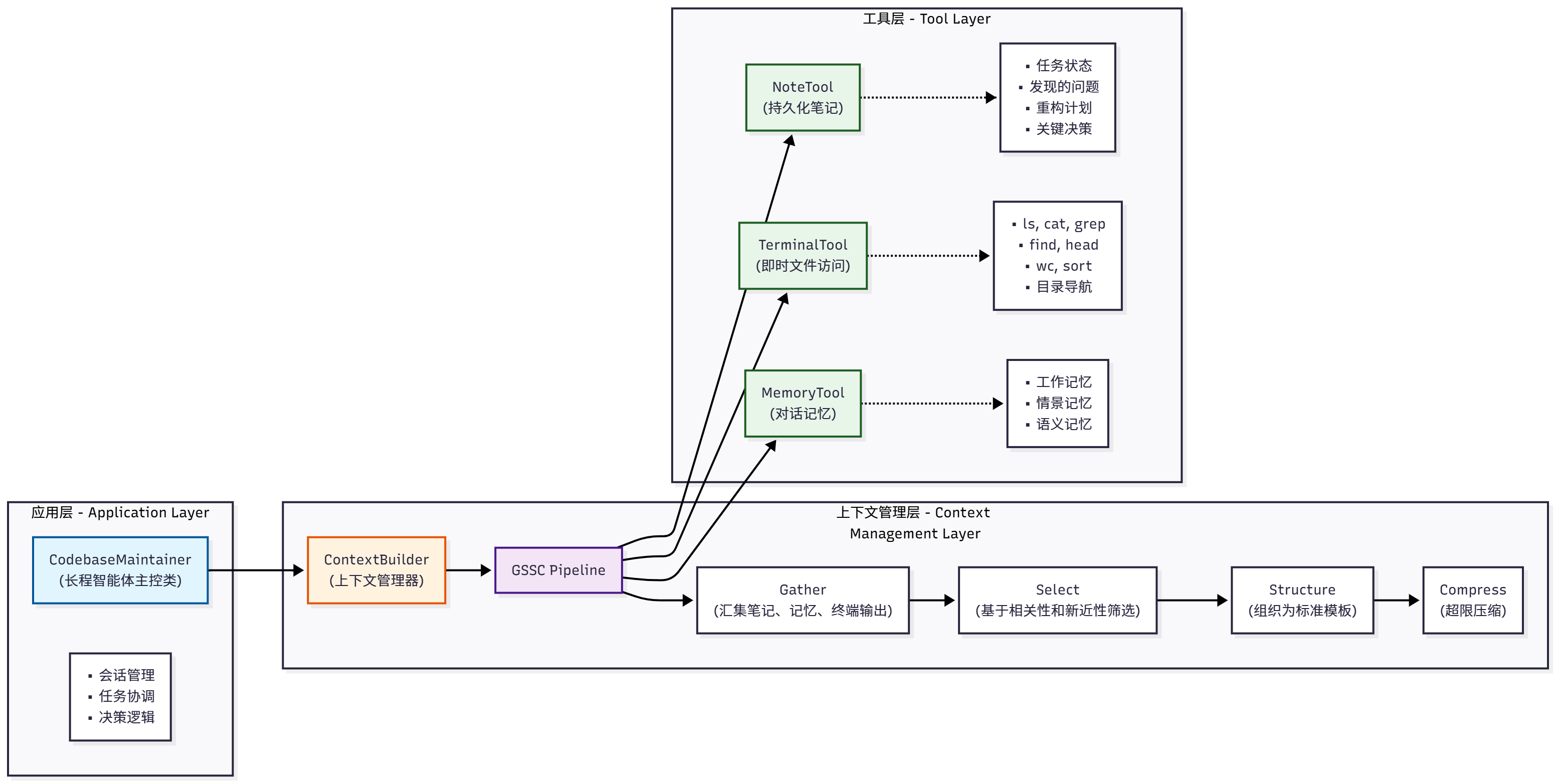
Figure 9.3 Three-layer architecture of codebase maintenance assistant